
Email-Based AI Agents for Law Firms – Mixus | Stanford CodeX Group Meeting 3.19.2026
Elliot Katz, co-founder and CEO of Mixus, presented to the Stanford CodeX group about his company’s email-based AI agents designed for law firms. Drawing on his background as an attorney and his prior startup Phantom Auto (which kept humans in the loop for autonomous vehicles), Katz built Mixus around the same principle: AI needs human oversight for high-stakes work. Mixus agents work entirely through email — attorneys simply email tasks in plain language and receive completed work product like redlines, issues lists, and cap tables in return — eliminating the change management burden that has slowed AI adoption in legal.
The platform includes firm-level approval workflows, automatic playbook generation from past documents, and deterministic gates that prevent outputs from advancing without human sign-off. The discussion touched on concerns around rubber-stamping, attorney-client privilege, and data security, with Mixus addressing those through SOC 2 compliance, zero data retention agreements with their model provider (Anthropic’s Claude), and an auditable email trail of who reviewed and approved each output.
Watch Mixus Codex Group Meeting on Youtube
Roland Vogl: Welcome everyone to our Codex group meeting. It is March 19th, 2026. I was just telling Elliot, our guest here, and my colleague Elaine, that we’re in the midst of a hot phase of preparations for our FutureLaw week.
So if you haven’t registered yet, you should do so. It’s going to be an amazing event, and just an amazing group of people who have already announced their participation. So don’t miss it. Join us for that. And today we have, as I said, Elliot Katz here. He’s co-founder and CEO of Mixus, which is bringing agentic AI into law firms and doing so in a safe manner. And so we’re really thrilled to have you here with us today, Elliot, and very excited to learn about what you’ve been up to. So I’ll turn it over to you.
Elliot Katz: Great, great. Thanks, Roland. Thanks so much for inviting me. I’m honored to be speaking to everyone here today at Stanford CodeX. As Roland mentioned, I’m the co-founder of Mixus. What we do is we provide email-based AI agents with built-in firm-level oversight to legal teams, including to multiple AmLaw 20 firms. As to my background, I’m what I like to call a recovering attorney.
So I did go to Cornell Law School, and from there I went to DLA Piper, where I led their autonomous vehicle practice. And then as a sixth year, I moved to McGuireWoods as a partner and global chair of their autonomous vehicle practice. And through my experience working with my autonomous vehicle company clients and getting to ride in their vehicles, I really concluded that autonomous vehicles could not be commercially deployed at scale without some way of keeping a human in the loop when the vehicles needed assistance.
Then fast forward to 2017. I met my now co-founder, Shai, who you can see here, when he gave me a teleoperated ride around the block in a vehicle he was remotely driving from his living room in Palo Alto. So at that point, I left the practice of law and we started Phantom Auto, where our technology enabled humans sitting literally thousands of miles away to remotely assist or operate unmanned vehicles when they ran into issues that autonomy could not handle.
Now fast forward to 2024. Shai and I co-founded Mixus together with essentially the same premise, right? Which is AI can do a lot, but if the stakes are high and the work is truly of consequence, you absolutely need a human in the loop. I mean, even if AI can get you 80 to 90% of the way there, you still need humans for that 10 to 20% when the circumstances mandate that everything—and I mean everything—must be done correctly.
So that’s who we are. Our DNA is human-in-the-loop, and we’re now applying that DNA to the legal sector with Mixus agents, which again combine artificial and human intelligence to provide the level of work product that this sector requires. So the first thing I’ll tell you, and this is based on my experience as an actual practitioner and from deploying Mixus agents to some of the top law firms in the world, is that your jobs as attorneys are safe.
I could probably find multiple LinkedIn posts in my feed right now that say, you know, lawyers and law firms won’t exist come 2027 because you’ll just talk to a chatbot. But we really believe that that is nonsense. Because for AI to be deployed at scale in the legal sector, you have to mix us—right, that’s the name of the company—artificial intelligence and human intelligence together. Right? Because the correct answer to a contract negotiation question is not a matter of factual accuracy, right? It depends on judgment and the client’s risk tolerance, the deal type, the counterparty’s position, and a multitude of other factors that simply don’t exist in the public domain. So Mixus exists not to displace attorneys but to greatly augment their brilliant legal minds.
So let’s dive in. So if we can go to the next slide. Why can’t attorneys just use fully autonomous agents for their work? First, because they’re probabilistic, right? And no client has ever hired an attorney for them to guess the next most probable word needed in a purchase agreement in a massive M&A deal, right? Clients hire attorneys for laser precision. They’re paying them hundreds of thousands, millions of dollars for laser precision. And that’s simply not what probabilistic AI provides.
Okay, number two: it’s not enough for an agent to have end-of-one oversight, right? You need oversight at the firm level so that attorneys with different areas of expertise can review and approve when appropriate and when needed, right?
And third, and this cannot be overlooked, the AI tools that exist today are standalone tools, right? Attorneys need to learn a new tool and integrate it into their workflow. And that level of change management has already proven very difficult for the legal sector, right? AI has taken off for coding, for example. And part of that is because coders are highly technical, right? For lawyers, as I’m sure many of you in the audience can appreciate, that’s not always the case, right? As a first-year attorney, I remember working with one partner—he was a brilliant attorney, but to this day I’m still not sure that he knew how to turn on a laptop, right? So asking someone like that to learn a new tool, learn a new UI, integrate it into their workflow—very, very difficult to do.
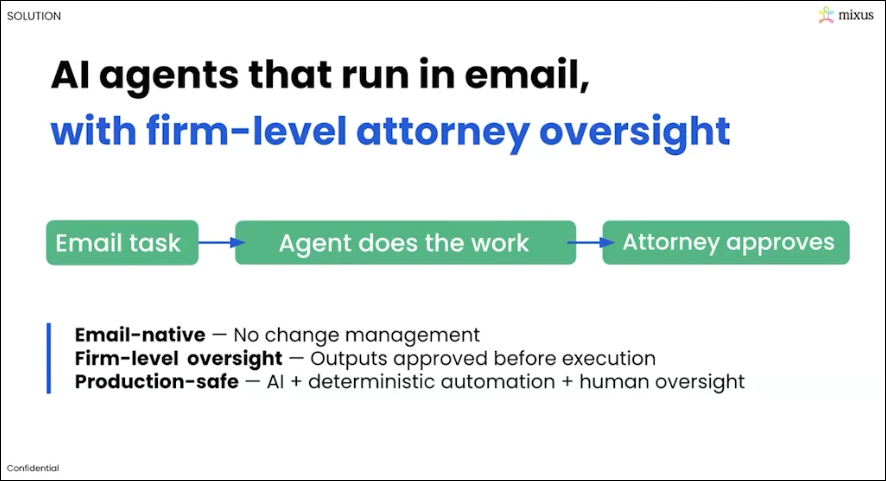
But with Mixus agents, we set out from day zero to solve all of these issues, right? Number one: we meet attorneys where they are most of their day, which is their email inbox. To use our agents—and I’ll show you guys this in a second—you just email agent@mixus.com a task in natural language, the same way you would talk to an associate or a partner, right? And you can cc any of your colleagues. The agent then emails back the completed work product, and the attorneys review and approve the agent outputs.
So we are mimicking exactly how lawyers already work today—exactly what they’ve now been doing for decades since email came out in the mid-’90s—collaboratively and in natural language over email, so that we fit exactly into their workflow with no change management at all. And because we enable that firm-level attorney oversight, legal teams get the efficiency of AI agents without the risk of incorrect AI outputs making their way to their clients or to, you know, a legal brief or anything that they’re submitting to the court. Obviously, we’ve all seen public examples of when that’s gone horribly wrong.
So now let me show you a quick demo of a few of our agents. And for the demo, I’ll show you some of our venture financing agents, as those are near and dear to my heart as a startup founder. So let’s start with our term sheet agent. And let me first set the scene, right? So let’s say that Mixus gets a term sheet today from XYZ VC firm. The first thing I do as the founder of Mixus is I forward that term sheet to my VC partner, and then they probably, in all likelihood, send it to one of their associates to do a redline and an issues list, which is exactly what I want to see. That’s the work product I need. And then the partner reviews, and I get it back a few days later. Also, maybe there’s tax implications or stuff like that—they bring in a tax partner or whatever it is. But the whole process, soup to nuts, is a few days here.
If you’re looking at the screen right now, in this example, Christian is emailing the Mixus agent the term sheet that he received, right? And the Mixus agent—the email address, you don’t see it in this format, but it’s agent@mixus.com—and he’s emailing the term sheet. So Christian here is playing like the partner at the law firm, and he’s also cc’ing some of his associates. And he’s saying redline the term sheet. So if you go down a few minutes later, he gets back an email that has everything that he would need that I, as a founder, want back from my attorneys. It has the redline, and it also has the issues list.
And you could, Christian, if you want to open up the redline, just to show everyone what that looks like quickly. Okay, great. Looks like a normal redline. And then go back to the email. And so you also do have the ability to click on the link here and go work directly in our web UI. What we’ve found with our deployments thus far: attorneys really want to stay in email. So most of them do everything that they do over email, which is entirely possible. But if you’d like a web UI, you can do that as well.
So go back to the email chain, Christian. So then if you go down, it’s telling you everything that it did. It attached the documents. But then one of the associates on the chain says, “Agent, please reduce the no-shop period from 60 days to 30 days.” So then if you go down, Christian, here it’s made that change. It’s attached all the new documents. And I don’t know if there’s anything more after that. If you can keep going down, Christian. Yeah, maybe you can show the issues. Yeah. So here’s the issues list that it produced. So you’re getting everything that you need, and you’re doing it exactly the way that firms are doing it today: collaboratively over email. Anyone can interact with the agent. You saw associates and partners interacting together and with the agent. And it’s all in natural language. So there’s no learning curve, right? You don’t have to understand how to do any of this.
The second thing that I’ll show is after you get the term sheet, we need a pro forma cap table. So Christian, if you could go to—yeah. So here he’s just saying, “Agent, create a new pro forma cap table based on the preexisting cap table that he’s attaching and the Series A term sheet.” And if you can go down, Christian, a few minutes later it’s going to provide that pro forma. You can click on the link just to quickly show everyone what that looks like. Looks very nice. It’s got the waterfall analysis, etc., which I like to look at, if you go to the left—stuff like that. So you can go back to the email and keep going down.
So he had—oh, I guess that’s it for the pro forma. The last one that I’ll show you guys is the M&A docs. That’s what you need to do after the pro forma. You already—let’s say this company already raised a seed round, and now they’re raising their A. So all the attorney has to do is attach the Series Seed docs and then ask for them to be updated based on the new term sheet. And that’s exactly what you’re going to get here.
And then if you can keep going down, Christian. He did cc one of his associates. So one of the associates chimes in and says, “Hey, I looked at everything, and everything looks good.”
So that is a very high-level, quick overview of Mixus. We’re going to take some questions in a second here. But if anyone listening is interested in learning more or trialing our agents, just reach out to me: elliot@mixus.ai. And because our agents are email-based, there’s no complex onboarding or installation required. We can set you up in minutes. And because we’re mimicking exactly how firms are doing this today, you know, we don’t need any elongated onboarding or anything like that. Attorneys just know how to use it pretty much instantly.
And last thing I’ll say is if you’re in the audience right now thinking, you know, “Geez, we brought in XYZ AI tool into our org or into our firm, but our attorneys aren’t really utilizing that tool,” we could be a perfect fit for you. Because our current customers all had or have licenses for other tools as well. But when everything comes down to usability, right—what AI tools will attorneys actually use day to day and integrate into their core workflow?—the firms that we’re working with today have found that our approach is really unparalleled in the market on that specific front.
So with that, let me know what questions we can answer, and we’ll move from there.
Roland Vogl: Yeah. So there’s a couple of questions coming in the chat, but I have, before we go to those, a couple of questions. So one is: how much setup time is involved for each firm? Presumably, you know, when you do those automatic—when your agents do those redlines—you know, they must be trained to know, you know, whatever—you know, how, what’s the, you know, the market for this or that, right? And so that must be based on the knowledge of the firm, right, or the human lawyers of the firm. How do you handle this process? And—great question—and how do you have—you talk about agents, you know, that’s like there’s one email for agents, right? But do you have agents for different verticals, you know, there’s like, yeah, VC practice and whatever environmental compliance practice—at least separate agents versus all like—
Elliot Katz: Yeah. Great question. So there’s really two questions in there. As to the first: many of our agents do not require a playbook. But some of our agents either, you know, do require a playbook, or the outputs that you’ll receive from the agent will be more tailored to your preferences if you do have a playbook.
Now, what we consistently heard from our customers, especially early on, is, “Listen, even if we have to make an upfront investment of time of a couple of hours of developing our own playbooks, the juice is potentially so worth the squeeze, because then we can use the agents moving forward.” And it’s not just a one-time, essentially, cost on our time.
But what we created was an automatic playbook builder. So now all you have to do to create a playbook is email in exemplars. Let’s say it was the first agent that I showed, the term sheet agent, right? You email in—attach a few exemplars of term sheets that you’ve done in the past or that you’ve redlined, and the system will ingest that. It will automatically create the playbook for you so that you have the foundation. And then you can just go in and make any edits that you want to fit your specific preferences.
And I think that’s what we’re showing right now on the screen, is the ability to make those playbooks. And after you make the playbook, the playbooks can also automatically update based on your preferences. So as you go through and do more work with the system, it understands your preferences and things that you changed along the way, and it will check in with you and say, “Hey, is this something that’s a one-off or a standard that you’d like to apply to the playbook generally?”
So that’s how we handle that piece. As to your second question, Roland, which was about which agents do we have deployed—so we have probably deployed like 50 agents at this point, both purely legal agents and also other agents that are not necessarily purely legal, right? For one firm that we’re working with, we are deploying—we’ve deployed a task management agent that basically serves as a project manager across all of your matters. It’s entirely over email. You can talk to it like a human. So it’s an agent that keeps the train on the tracks when associates are working with six different partners and five different matters for each. It can coordinate amongst those groups seamlessly, 100% over email. So again, no tool switching, no change management.
But we deploy agents that are common in each practice. And then another thing that we do with our customers is we will build and deploy custom-built agents. So not only will we optimize current agents to tailor them to fit their practices specifically, but if they have a new workflow where they would find a lot of value because their firm does a lot of XYZ work, we will create those agents for them as well.
Roland: Got it. So Benjamin raises a good question, too, which is, you know, going to the point that, you know, we need human oversight, but how do we make sure that humans are not just rubber-stamping the AI outputs, right? Like, how hard is it to actually, you know, really go into the outputs of the AI and review, you know, the accuracy of the output? And so we’re not sort of like in the ballpark, “Okay, let it just go out like that.” So what’s—what level of—what is oversight mean? And how do we make sure that it’s not just people rubber-stamping the AI?
Elliot: Yeah, absolutely. Great question. So first of all, to kind of the middle part or second part of your question: very easy to review the outputs, right? These are attorneys where it’s their subject matter expertise, right? So you’re going in, you’re reviewing a redline, you’re reviewing a new document that the agent put forth. You have all the facts, you have everything in one chain if you’re on email, or in the chat if you’re on the web UI.
As to the second point, there is no kind of blind rubber-stamping here, because at the end of the day, you do have a human who is on record of being responsible for checking this, right? In the same way that my VC partner would send an issues list to an associate today and say, “Review this and make sure everything’s accurate and all that,” that’s what’s happening when a human reviewer is signing off here as well. And there is a record of who verified, right?
So some of the firms that we’re working with—they’ve created rules, right, where AI outputs cannot go out in work product to a client before at least one partner signs off, or whatever the rule may be. And you have a record, an email, of someone saying, “I verified that this looks good, and we can proceed.” So it’s the same kind of social pressure, for lack of a better term, as to why you would get the same outcome that you would get today.
Roland: So like—that’s good. Yeah. So Jason has a question. Sorry, Benjamin, did you want to add something on that?
Benjamin: Yeah, I’d like to raise—like, there have been federal judges that have had their interns or their clerks, you know, do things, and they just rubber-stamp it. And even federal judges who’ve had AI stuff that has been rubber-stamped. And while they didn’t literally put their signature on it, I think the meaningfulness of a review is to verify that the person who actually is reviewing it understands what is going on in some sort of interactive way. And I know that you have a limited managed work budget. And when you get too much work, you just sort of rubber-stamp things. And so how do you sort of force them to slow down and put like a roadblock to make sure that they tell the system that they understand why?
Elliot: Yeah. I mean, I think I would answer just similarly to kind of what I said before, in the sense that no different than if you give an associate something to review before it goes out to a client today—they know that they’re kind of, their butt’s on the line, for lack of a better term. That’s similar to the way our system works, right? There’s still the person who is the front line making sure that everything is in place before it goes over to the client, and all that is auditable. There’s a record within email or using the chat as to who, you know, was doing those checks.
Roland: Yeah. I guess it’s also a, you know, a question of like, you know, continuing to sort of instill a sensitivity in people who use AI in professional services and elsewhere, you know, about, you know, that it’s not, you know, it’s not perfect and it may hallucinate and so on. And then, you know, and understanding that then, you know, their reputation is on the line if they don’t, you know, provide meaningful review. And so, yeah, I think it’s a little unclear now, but I think it will sort of become clearer in the future as to what level of control different humans will be able to, you know, display over AI. But yeah, it’s a really good question, Benjamin. And Jason had a question on—I could just ask about client privilege.
Jason: Yeah, yeah. So obviously attorneys are using Harvey AI and Legora and, you know, Westlaw and all the other stuff. But, you know, in practice, what are you hearing as far as any pushback of using an LLM on the backend? It’s putting, you know, client data into the LLM. And yes, I’m sure that the APIs have, you know, good terms of service, but still you’re getting—at this point, what kind of concerns are attorneys or law firms at the corporate level saying about attorney-client privilege? Because like the New York Times versus OpenAI case back in last May has still not been, you know, fleshed out where it’s going to land. And people are kind of wondering about that.
Elliot: Yeah, yeah. So I mean, first of all, on the security side, especially for the customers that we work with, we go through, you know, very lengthy security reviews. We have all the things that these big law firms would expect, right? We’re SOC 2, we have all the ISOs that we need in place, etc. Also, with our model provider, we have a zero data retention agreement in place. So I think we’re buttoned up on that side in the eyes of our customers.
Going to your question about privilege, you know, my opinion—and this is, you know, based on many conversations that I’ve had with our customers—is that this is basically settled law, right? In the sense that law firms have been using vendors for years, right, that do document review and other things. And those are considered part of the privilege. So, you know, we haven’t run into any issues there yet. But we’d love to hear if you have, you know, kind of a different tack or different thoughts on the subject.
Jason: Well, you know, it’s perception, you know, on this matter, right? And there are some, you know, folks that I’ve worked with in some law firms that feel—but it’s perception. And you have to make that case and say, “Well, everybody else is doing that.” And you’re like, “Well, we’re not everybody else,” right? So I was just curious what you’ve seen, you know, in the trenches as you work with some of them, because some of them can be very, very conservative about that point.
Elliot: Oh yeah, yeah. No, no, for sure. Like, email has been established in the industry very clearly. And if you have a cloud provider, you know, that’s a branded cloud—like, you’ve got your decades there. But LLMs in particular have, you know, some aspects to them as far as, you know, bioterrorism and other things that they’ve got people watching, a sampling of these things, and that’s throwing up other questions anyway we can offer—
Jason: No, no, I think that, yeah, I think it’s—listen, this is a very important topic. And to your point about, you know, cloud providers and all that—I mean, we have talked with major law firms that have not migrated to the cloud, right? They are still completely on-prem, right? So these are very conservative, you know, security-first organizations. And we molded our company around that expectation. I mean, I came from this world. So I mean, that’s probably the thing that we’ve invested from a time perspective, you know, and dollar-wise, just a huge amount of time and money into security.
Jason: Yeah, it’s—oh, you’ve done a nice job. It looks really good.
Elliot: Thank you. Thank you, I appreciate it.
Roland: Yeah. There’s a couple more questions in the chat. I’m not sure we can get to all of this. I know Dasa has mentioned a little bit of his work with the agencies he’s been creating. So, Dasa, you want to elaborate?
Dasa: Yeah, sure. Thank you, Roland. And yeah, I agree—great presentation. I was just saying I’ve been spending a lot of work with clients lately developing agents to do reviews and red-team before, basically, like the attorney or the business person even sees the draft. Do you have flows that basically include some sort of review or red-team-y loop for that type of revision before, you know, basically as a gate before it gets to a next step in a process?
Elliot: Great question. Christian, do you want to chime in on this one? I know it’s a topic near and dear to your heart.
Christian: Yeah. So we do have a way that you can define different steps in a process, so you can decide, you know, very specific processes that you have. I can show you one example of that actually over here. So if you’re following one specific process very regularly, one thing you can do is say, “Save this workflow as an agent.” And then whenever a new email comes in, you can have that specific agent run. So you can also just create these custom workflows just by talking to the agent. So yeah, that’s possible as well.
Dasa: Okay, that’s great. Thanks.
Roland: And look, Roland, I’m wearing my CodeX hat, getting ready for FutureLaw.
Elliot: Oh, I appreciate it, yes.
Roland: Yeah, getting into—you’re getting into the spirit. I love it.
Elliot: Right, super.
Roland: Okay, so Matthew, yes, one comment—thinks that a tool like yours would free up a lot of time since it’s doing a huge chunk of the first round of work. Yeah. This just goes to the concern around, “Well, is somebody just going to rubber-stamp it?” I think we’re going to have way more time than we ever had ever before when these AI tools are doing a huge amount of the work.
Elliot: Yeah. I couldn’t agree more with that statement. We’re already seeing it with our customers. You know, some of the feedback that we’re getting is, “I’m as busy as, you know, as I was before we were using the tool. I’m just doing a lot more work a lot more efficiently for a lot more clients,” right? But I think you are going to see that this role of essentially managing agent outputs, verifying the agent outputs, is going to be—not just in the legal sector, but more broadly—a big part of how work gets done moving forward.
Roland: Okay. And then Mavi asks a question quickly on the sort of backend security of the LLM model. Yeah, it’s the sort of multi-modal architecture—is the sort of oversight really mainly carried out by the humans in the loop?
Elliot: So Christian, you want to jump in on that one too?
Christian: We mainly use Claude. And, you know, we have a zero data retention policy with them, as Elliot mentioned. So that’s the sort of base model that we use. So we have different ones that you can choose from. So we just keep sort of following up on, like, okay, whenever there’s a new model evolution, right—so right now it’s Opus, that’s the latest one. That’s the one we’re using. So we always use the latest and greatest model from Claude, basically. So I mean, that’s in terms of the underlying model. So I just want to understand the question on the human side—like, what was that exactly?
Question: Is there a sovereign layer to review output from a software side, or is it only human-in-the-loop, basically, right?
Christian: Yeah. So what I could say there, like, we have deterministic gates. So until someone approves one step, it’s not going to continue on to the next step. And that’s a deterministic thing you can configure. So you can also do that within the UI, actually. So if you go over here and you want to create a new agent, that is possible. Then you can create that here, and then you can see you can define these different steps. All of this is possible via email as well. So you can just tell the agent to create these different steps for a new agent or workflow that you have. And then you can say, “Require verification.” And then you can define the users that you want to verify. So in this step, you could say, “Okay, I want this, you know, user to verify step one before it continues on to step two.” And that’s going to be a deterministic approval that has to take place before it goes on to the next step, right? So that’s, you know, similar to what was mentioned before on these custom workflows. That’s how we can support that as well.
Roland: Right. Well, we’re already a little bit over time. So we have to close here, unfortunately. But what would be a good way for folks to reach out with any follow-up questions? Do you think you could put your email address into the chat, perhaps?
Elliot: Yeah, absolutely. It would be great. And so the easiest way is just email, or you can find me on LinkedIn as well. And look forward to chatting with anyone that wants to learn more.
Roland: Super. Love it. Thank you so much, Elliot and Christian. It’s been a great presentation. It’s very cool. It’s like, you know, kind of like I feel like I’ve seen the future. And so, so amazing. Thank you for sharing with this group here. And yeah, we look forward to tracking your progress.
Elliot: Okay. Awesome. Thank you guys so much. Really appreciate it, Roland.